BoatUS - Boat Weather & Tides
BoatUSWeather
4.51.46K Reviews
- Version
- 4.12.5
- Installs
- 100.00K
- Age Rating
- Everyone
Screenshots
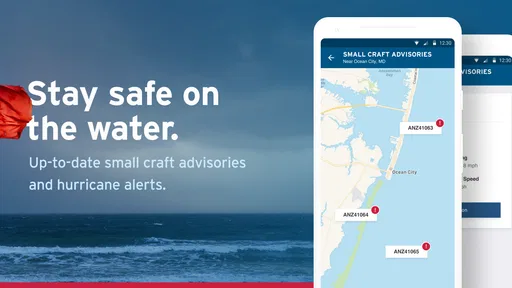
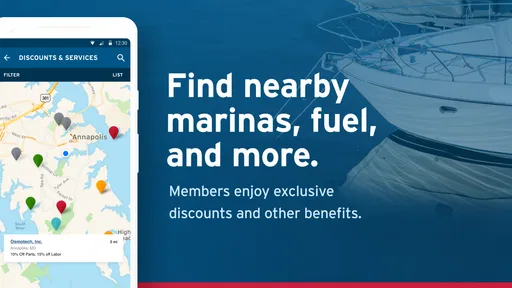
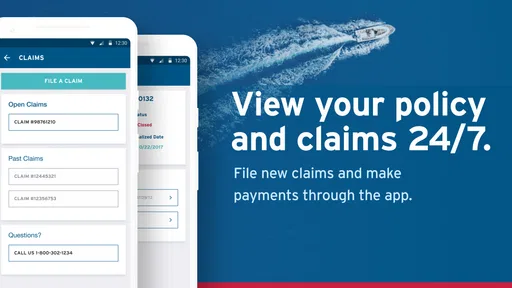
Our Review of BoatUS - Boat Weather & Tides
 Analysis by Appyee
When I first looked at BoatUS - Boat Weather & Tides, I expected a straightforward marine utility rather than a general-purpose weather app. That is exactly the right way to approach it. It comes from BoatUS, and its focus is practical support for people who spend time on the water, especially those who want weather-related awareness alongside access to marine towing and insurance services. The app is free, rated for Everyone, and available for devices running Android 8.0 or later.
My main impression is that this is not an app designed to replace every weather tool on your phone. It is more useful when viewed as part of a boating routine: check conditions before leaving, keep the service available during a trip, and know where to turn if a problem develops. That narrower purpose is also its biggest strength. Instead of trying to be a complete forecast platform for every activity, it speaks more directly to boat owners and passengers who need boating context.
What to expect before you rely on it
The store summary describes the app as offering 24/7 marine towing and insurance support. That wording sets an important expectation. This is not simply a tide chart with a decorative nautical theme. The app is connected to the wider BoatUS service experience, so its value depends on whether you are actually interested in boating assistance, membership-related services, or marine protection.
That makes it a more natural fit for someone who owns a boat, regularly borrows one, or spends enough time on the water to care about practical support after a breakdown. A casual beach visitor who only wants tomorrow’s rain forecast will probably find a normal weather app faster and more familiar. I would also avoid treating this as the only preparation tool for a serious trip. Weather can change quickly, and an app focused on one service ecosystem should sit alongside responsible planning rather than replace it.
The app has been available since March 6, 2017, and the current release is version 4.12.5. Those details matter less than the way the app fits into your habits, but they do suggest that this is an established product rather than a newly launched experiment. It has passed the point where a first-time user should expect a completely untested interface, although the experience still depends on your phone, connection, and the information you enter.
Its audience is reflected in its reception: it holds a 4.5 average from around 4.7 thousand ratings, with more than a thousand written reviews, and has been installed over 100 thousand times. I see those figures as a sign that the app has a real boating audience, not as proof that it will be perfect for every sailor. A towing-focused tool can be very valuable to one person and almost irrelevant to another.
Who will get the most from it
I would recommend starting with this app if you want one BoatUS-focused place to keep marine assistance close at hand. It is especially sensible for boat owners who dislike searching through old emails, paper documents, or several unrelated apps when something goes wrong. Having a dedicated service app can reduce the mental load during an already stressful situation.
It can also suit a new boat owner who is still building a pre-departure routine. Rather than opening a general weather app, a navigation tool, a membership page, and a separate insurance reference every time, you can begin by checking what BoatUS provides in one place. That does not eliminate the need for other tools, but it gives your safety preparation a clear starting point.
I would skip it if you are looking for detailed professional navigation, chart plotting, or a broad worldwide forecast system. Nothing about the app’s identity suggests that it is meant to replace specialist navigation software. Likewise, if you never use boats and have no interest in marine towing or insurance, its main advantages will not justify adding another app to your phone.
Getting through the first setup
My advice for a first-time user is to install it before the day you need help. The worst moment to learn a service app is when you are sitting in a disabled boat, dealing with wind, current, or a fading phone connection. Open it at home, look through the available areas, and make sure you understand where the assistance and account-related information live.
Start by reading the opening screens instead of tapping through them automatically. Apps connected to a service provider often divide their information between general public resources and details intended for customers or members. Understanding that distinction early prevents a common mistake: assuming that every screen is a live emergency tool or that every benefit applies automatically to every user.
If the app asks you to sign in or provide account details, use the same information associated with your BoatUS relationship. Keep your contact information current, because a service app is only as useful as the details available when you need assistance. I would also save any important membership or policy information in a place you can reach without relying entirely on memory.
One practical setup habit is to check the app while connected to a reliable network, then open it again from the place where you normally prepare your boat. This simple test tells you whether the interface feels clear on your device and whether you can reach the functions you care about. It is not a substitute for checking service availability, but it is a good way to discover login friction before a trip.
Because the minimum operating system is Android 8.0, older phones may not be suitable. If you use a dedicated phone on your boat, verify compatibility before depending on it. A modern primary phone may run it comfortably while an older backup device may not. That is a small detail, but it matters when your backup plan is supposed to work away from home.
The first meaningful success
The first useful action is not merely opening the app. It is completing a small rehearsal: find the marine support area, identify how you would request help, and review the insurance or service information that applies to you. I would do this while sitting at the dock or at home, not after an engine problem has already interrupted a trip.
Try to imagine a realistic situation. You leave for a short afternoon outing, the motor stops, and you are safe but unable to return under your own power. In that moment, you do not want to explore every menu. You want to know whether the app can guide you toward the relevant BoatUS assistance path and whether your account information is ready. Practising that sequence turns the app from something installed into something usable.
A second useful action is to compare what the app gives you with the rest of your boating kit. Keep your normal weather source, navigation equipment, communication method, and emergency contacts available. The BoatUS app can occupy the service and support part of that system, but it should not become your entire safety plan. The best use is as a prepared backup, not a last-second substitute for preparation.
For a new user, this is reassuring because success does not require mastering a complicated dashboard. You can make progress by learning one route through the app and confirming that your personal information is in order. Once that is done, the app has already earned its place on your phone even if you never need to request a tow.
Where first-time users may become confused
The most likely confusion is expecting a conventional weather app because the product is presented as a marine weather and tides application. A general weather app usually begins with a location, forecast cards, radar, or alerts. BoatUS has a broader service identity, so the first screen may make more sense when you think like a boat owner rather than like someone checking whether to walk the dog.
Another possible misunderstanding is assuming that the presence of towing information means assistance is automatically available without any account, service relationship, or practical conditions. I would read the relevant terms and account screens carefully. Keep in mind that an app can provide a route to a service without guaranteeing that every situation is covered in the same way. Insurance and towing are areas where the details matter, so avoid relying on a quick glance at a headline.
It is also easy to confuse convenience with coverage. Having the app installed does not mean your phone has a signal everywhere, that your battery will last all day, or that the app replaces marine radio and other communication options. Before leaving, charge your phone and carry the equipment you normally depend on. If you travel beyond reliable coverage, plan accordingly rather than assuming the app can solve a connection problem.
Location-related expectations deserve care as well. Marine information is useful only when it is connected to the right place and situation. Check that the location or boating area you are considering is the one you intend to use, and do not treat a nearby reading as a perfect description of conditions farther away. Water, wind, and local geography can make conditions differ over a surprisingly short distance.
Finally, remember that a free download does not necessarily mean every service relationship is free or identical for every person. The app itself costs nothing to download, which makes it easy to try, but your eligibility for particular BoatUS services depends on the relevant service or insurance arrangements. That distinction is worth understanding before you interpret a button as a promise of unlimited assistance.
How it compares with the usual alternatives
Compared with a standard weather app, BoatUS is more specialized and more connected to the practical concerns of boat ownership. A general app may be better for quickly checking rain, temperature, or broad forecasts across many activities. BoatUS makes more sense when the question is, “What do I do if my boating day turns into a mechanical or service problem?”
Compared with a dedicated navigation app, it serves a different purpose. Navigation software is usually built around routes, charts, position, and trip planning. I would choose that kind of tool when I need to understand where I am going. I would choose BoatUS when I want a clearer path to BoatUS-related support and marine assistance. Keeping both can be reasonable because they solve different problems rather than competing directly.
Compared with paper insurance documents or a phone number saved in contacts, the app is more convenient when you remember to prepare it in advance. The trade-off is dependence on the device and connection. Paper information is slower to search but does not need a charged smartphone. A phone contact is quick but may not include the context or account pathway available inside a dedicated service app.
This comparison also explains why I would not recommend installing it solely because you saw the word “weather.” Its strongest reason to exist is the combination of marine awareness and BoatUS support. If you want a richer forecasting interface, choose a weather tool designed around that. If you want a safety-oriented companion tied to a boating service provider, this app becomes much more compelling.
Building a dependable boating routine
After the first setup, I would use the app as one checkpoint in a repeatable routine. Before leaving, review the conditions relevant to your outing, confirm that your phone is charged, and make sure the support information is accessible. Then check that your other navigation and communication tools are ready. This takes less time than trying to reconstruct your options after a problem begins.
For family boating, show another person where the assistance information is located. The person who normally handles the phone may not be the person at the helm when something goes wrong. A short explanation at the dock can make the app useful to more than one member of the group. This is an overlooked advantage of a dedicated service app: it gives everyone a common place to look.
For occasional boaters, open the app before each trip rather than assuming you remember its layout. Apps change, accounts expire, and contact details become outdated. A brief check helps you notice those issues while you still have time to fix them. It also prevents the false confidence that comes from having an icon on the home screen but never confirming that the important path still works.
For frequent boaters, the best workflow is to separate planning from response. Use your normal tools to plan the route and understand conditions. Use BoatUS to keep the service and insurance side organized. If you combine those roles mentally, you are less likely to expect one app to provide every answer and more likely to use each tool where it is strongest.
One non-obvious benefit is psychological: knowing where help information is can make you calmer without encouraging careless decisions. That only works if you treat the app as preparation, not permission to take unnecessary risks. A towing service should support sensible boating, not replace maintenance, fuel planning, weather judgment, or proper equipment.
My final view for a first-time user
I see BoatUS - Boat Weather & Tides as a focused companion for people who want marine support close at hand. Its free price makes trying it easy, and the Everyone rating keeps it accessible to a broad audience. The developer, BoatUS, has built it around a specific boating relationship rather than a generic forecast experience, and that focus is what gives it practical value.
I would install it before a boating season or before an upcoming trip, then spend a few minutes learning the assistance route and checking my account details. I would not wait until a breakdown to discover how it works. I would also keep a separate weather or navigation solution when I need deeper forecasting, chart work, or trip planning.
My recommendation is therefore conditional but positive. Boat owners and regular passengers should give it a serious look, especially if BoatUS towing or insurance services are relevant to them. People who only need ordinary daily weather should choose a broader weather app instead. For the right user, the important success is simple: when the day goes wrong, you already know where to start.
Verdict
Strengths of BoatUS - Boat Weather & Tides
- Detailed tide and current predictions for U.S. coastal locations.
- Offline access to saved weather forecasts is useful on the water.
- BoatUS membership features and services are integrated in one app.
- Location-based forecasts make checking nearby conditions quick.
- Marine weather information is presented in a boating-focused format.
Limitations of BoatUS - Boat Weather & Tides
- Coverage and features may be less useful outside the United States.
- Some services and benefits require a paid BoatUS membership.
- Forecast accuracy can vary in rapidly changing coastal conditions.
- The app may request location access for several core features.
- Certain screens and data can feel dense for first-time boaters.
Similar Picks in This Category
View All
Weather - By Xiaomi
Xiaomi Inc.4.1

Weather & Radar Forecast
WetterOnline4.8

Weather
OneLouder Apps4.6

AccuWeather: Weather Radar
AccuWeather3.6

The Weather Channel - Radar
The Weather Channel4.6

1Weather Forecasts & Radar
OneLouder Apps4.3
Frequently Asked Questions
What is BoatUS - Boat Weather & Tides used for?
BoatUS - Boat Weather & Tides is designed to help boaters prepare for trips and monitor changing conditions on the water. It provides boating-focused weather information, tide details, forecasts, and related planning tools. After exploring the app, it feels most useful for checking conditions before departure and keeping an eye on weather and tides while organizing a route.
Does BoatUS - Boat Weather & Tides provide accurate marine weather and tide information?
The app gathers weather and tide information from available forecasting and coastal data sources, making it a practical reference for everyday boating decisions. However, forecasts can change quickly, particularly during storms or in coastal areas with rapidly shifting conditions. It should support, rather than replace, official marine warnings, local knowledge, onboard instruments, and responsible navigation practices.
Can I use the app to check tides for a specific location?
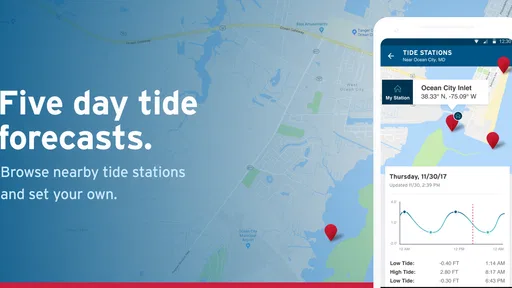
Yes, the app is intended to help users find tide information for selected coastal locations and plan activities around high and low water levels. This can be helpful for cruising, anchoring, fishing, launching, or navigating shallow areas. Users should confirm that the selected station is close enough to their destination, since tide times and heights may vary between nearby locations.
Does BoatUS - Boat Weather & Tides require an internet connection?
An internet or mobile-data connection is generally needed to load updated forecasts, weather maps, tide information, and location-based content. Coverage may be limited offshore, so boaters should check important details before leaving the dock and avoid relying entirely on live app data. Depending on the device and app version, some previously loaded information may remain available temporarily, but offline access should not be assumed.
Is BoatUS - Boat Weather & Tides free to download, and are there extra costs?
The application may be available to download without an upfront charge, but availability, included features, advertising, memberships, or optional BoatUS services can vary by platform and region. Before installing, review the current Google Play Store or Apple App Store listing carefully. Also check whether any connected services, subscriptions, or membership benefits require separate registration or payment.
